|
On the closing bar, view horizontal text boxes of open positions to see the order type (buy/sell), lots, dollar profit and pips. These text boxes will be color coded as follows:
- Profitable Buy Color: Green
- Unprofitable Buy Color: Yellow Green
- Profitable Sell Color: Red
- Unprofitable Sell Color: Orange
|
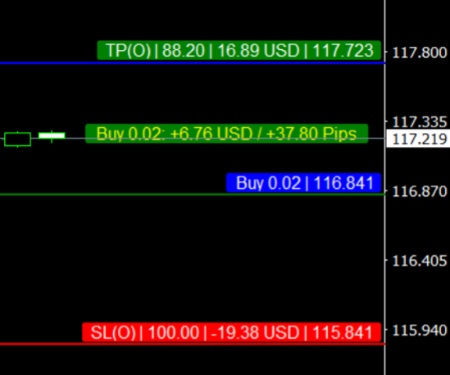 |
Left click once any open trade text box to open more horizontal text boxes (Open, Close to SL, and Close to TP):
- Open Price Level (Blue Horizontal Text Box): shows where trade opened, its lot size and price level (ex. 116.841).
- Stop Loss Level (Red Horizontal Text Box) from Open to SL: shows where SL sits, pip distance from Open to SL (ex. 100 pips), how much you would win/lose in dollars from your Open Price to SL (ex. -19 USD), and SL price level itself (e. 115.8541).
- Take Profit Level (Green Horizontal Text Box) from Open to TP: shows where TP sits, pip distance from Open to TP (ex. 88.20), how much you would win in dollars from your Open Price to TP (ex. 16.89 USD), and TP price level itself (e. 117.723).
|
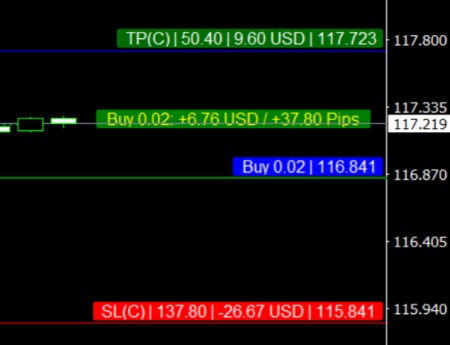 |
Left click once any Open, SL or TP text box show a different variation of your SL/TP levels — the dynamic Close price to SL/TP levels:
- Stop Loss Level (Red Horizontal Text Box) from Close to SL: shows where SL price level sits, pip distance from Close to SL (ex. 137.80 pips), how much you would win/lose in dollars from Close to SL (ex. -26.67 USD), and SL price level. Because the close price is always moving, the Close to SL numbers are likewise dynamic, always updating.
- Take Profit Level (Green Horizontal Text Box) from Close to TP: shows where TP price level sits, pip distance from Close to TP (ex. 50.40), how much you would win in dollar from Close to TP (ex. 9.60 USD), and TP price level. Because the close price is always moving, the Close to SL numbers are likewise dynamic, always updating.
* Left click twice on any Open, SL or TP text box to exit these horizontal text boxes. |
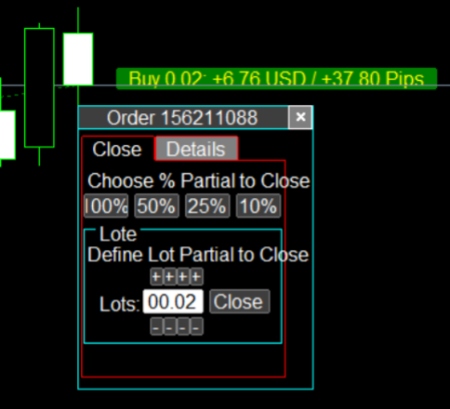 |
Left click twice on any open trade textbox to show advanced close features. Choose between two ways of partially closing your orders:
- Choose % Partial to Close: 100, 50, 25, 10. If you click on [50%] button, for instance, you will close 50% of your position’s lots.
- Define Lot Partial to Close. This advanced dial mechanism allows you to quickly and accurately indicate the exact lots you want to close. The default is set on the full lots of your trade. When you have successfully dialed in the amount you want to close, just click the [Close] button.
|
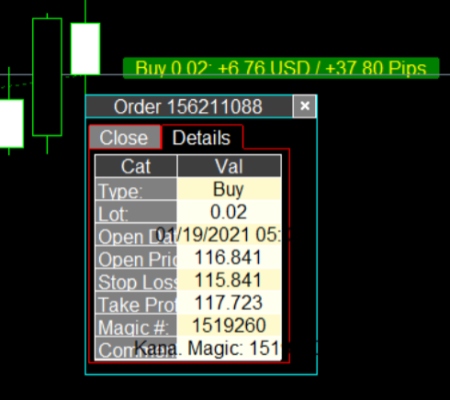 |
Click on Details Tab to see the Details of the Order:
- Type – Buy or Sell
- Lot – Lot size
- Open Date – Date when order opened
- Open Price – Price of open order
- Stop Loss – SL price
- Take Profit – TP price
- Magic #: Magic Number (usually of EA, if any)
- Comment: Comment (usually of EA, if any)
|



