

Introduction to the Linear Regression Channel Indicator
The Linear Regression Channel Indicator was first developed by Gilbert Raff, which is why it is often coined as the Raff Regression Channel. It was developed for the purpose of helping traders identify the upper and lower extremes of a price range.
What is the Linear Regression Channel Indicator?
The Linear Regression Channel Indicator is a technical indicator which allows traders to identify the upper and lower limits of a price range as well as the general trend direction of the market.
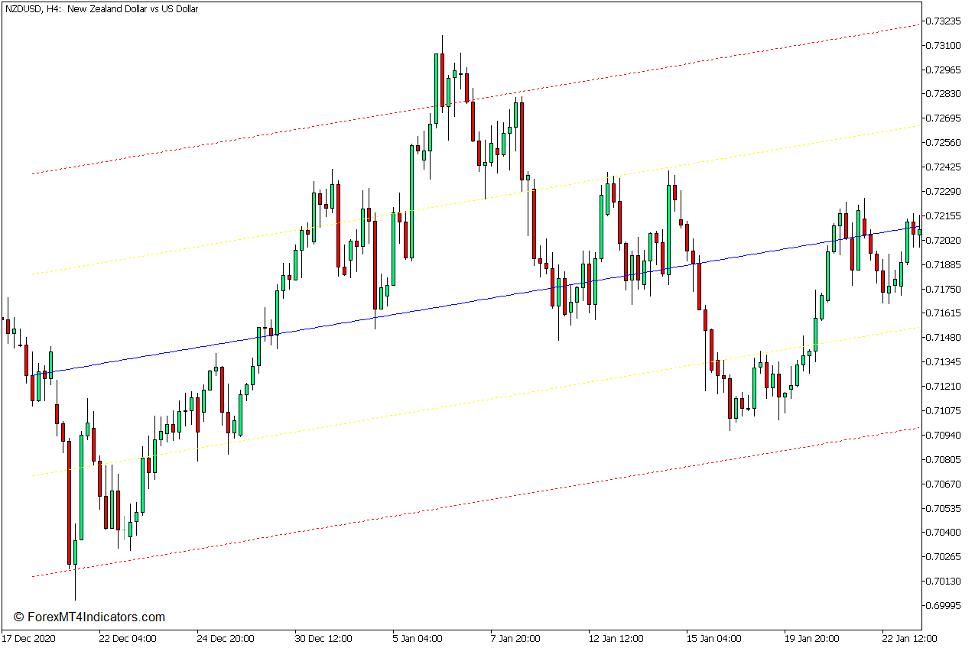
This indicator plots a Linear Regression Channel which is composed of five lines or four sections. The outer lines are marked by red dashed lines, the middle line is marked by a solid blue line, while the area between the solid blue and dashed red lines are divided by a dashed yellow line. These lines form the four quarters of the channel.
How the Linear Regression Channel Indicator Works?
The Linear Regression Channel Indicator uses an algorithm which identifies the highest highs and lowest lows of price action within a given timespan. It then uses a formula which incorporates linear regression in order to identify a support and resistance line which accommodates around 68% of price within the channel. It then plots the middle blue line and the yellow dashed lines to help traders identify the sections of the channel effectively.
How to use the Linear Regression Channel Indicator for MT5
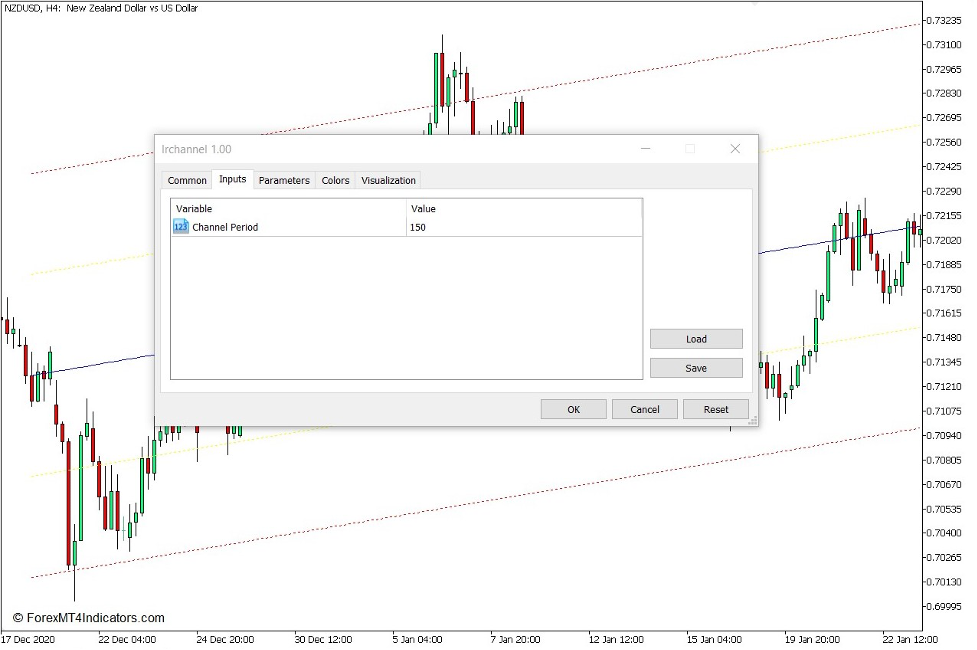
This indicator has one variable which allows traders to modify how the indicator identifies the Linear Regression Channel of a market.
The “Channel Period” variable allows traders to change the number of bars the indicator uses for it to compute for the Linear Regression Channel.
Traders can use this indicator to identify the general trend bias of the market based on the direction of the slope of the lines.
It can also be used to trade a channel-based strategy wherein traders would trade reversals which occur on the outer extremes of the channel preferably on the area between the dashed red and yellow lines or beyond the dashed red line. Trading in the direction of the trend can also be beneficial as it allows for better risk reward ratios and higher accuracy.
Buy Trade Setup
When to Enter?
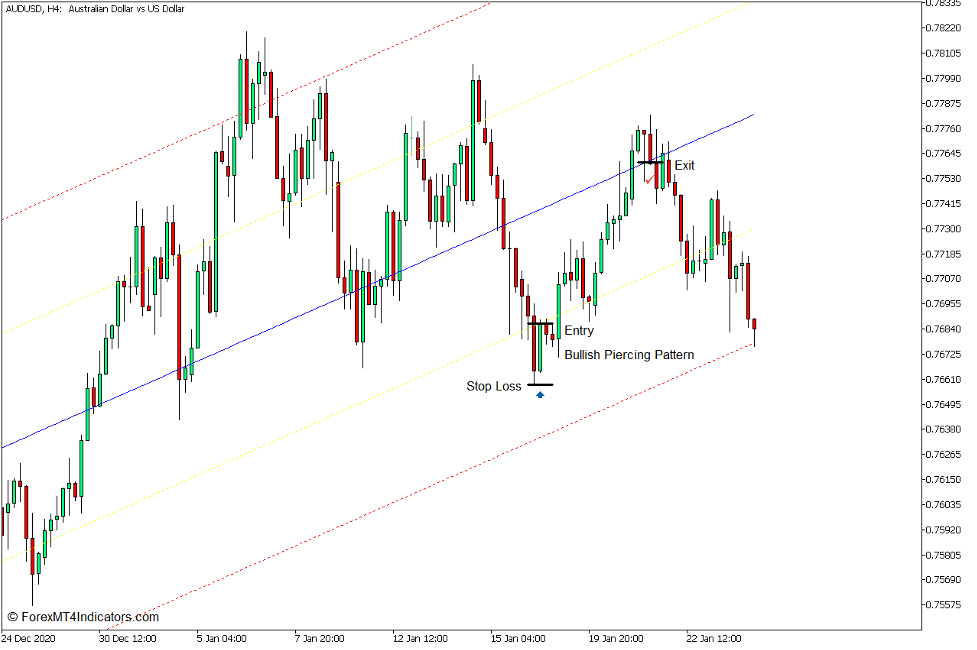
Identify a bullish trend bias market based on the slope of the Linear Regression lines. Open a buy order as soon as a bullish reversal pattern develops in the area between the lower yellow and red dashed lines. Set the stop loss below the pattern.
When to Exit?
Allow price to break towards the upper half of the channel. Close the trade as price action shows signs of a bearish reversal.
Sell Trade Setup
When to Enter?
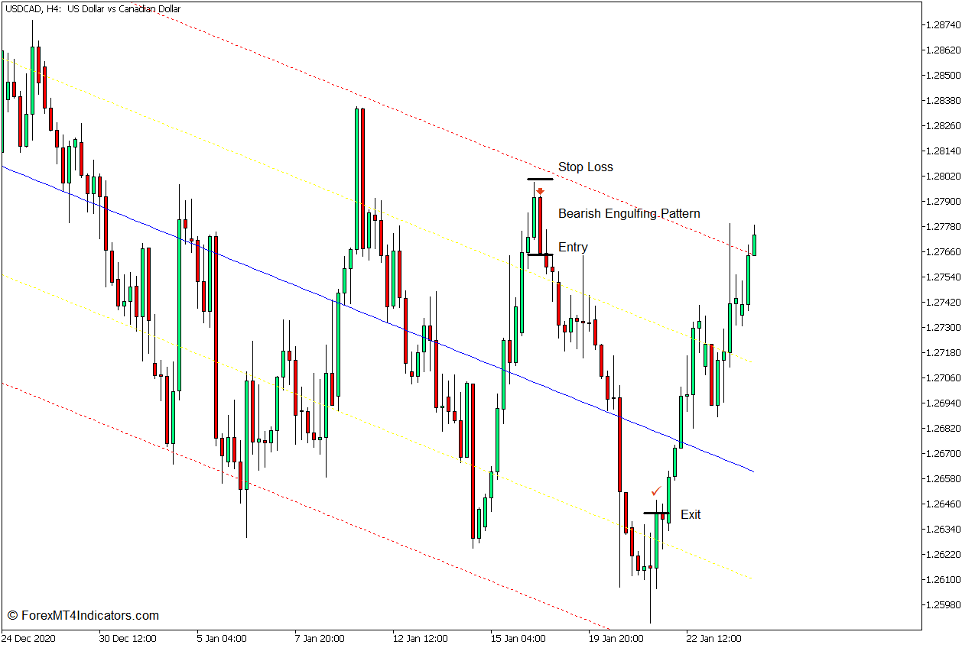
Identify a bearish trend bias market based on the slope of the Linear Regression lines. Open a sell order as soon as a bearish reversal pattern develops in the area between the upper yellow and red dashed lines. Set the stop loss above the pattern.
When to Exit?
Allow price to break towards the lower half of the channel. Close the trade as price action shows signs of a bullish reversal.
Conclusion
This indicator can be a useful tool for traders who would want to practice trading a channel based trading strategy. It automatically identifies the support and resistance lines of the channels making it easier for new traders to identify the structure of the channel.
MT5 Indicators – Download Instructions
Linear Regression Channel Indicator for MT5 is a Metatrader 5 (MT5) indicator and the essence of this technical indicator is to transform the accumulated history data.
Linear Regression Channel Indicator for MT5 provides for an opportunity to detect various peculiarities and patterns in price dynamics which are invisible to the naked eye.
Based on this information, traders can assume further price movement and adjust their strategy accordingly. Click here for MT5 Strategies
Recommended Forex MetaTrader 5 Trading Platforms
#1 – XM Market
- Free $50 To Start Trading Instantly! (Withdrawable Profit)
- Deposit Bonus up to $5,000
- Unlimited Loyalty Program
- Award Winning Forex Broker
- Additional Exclusive Bonuses Throughout The Year

>> Claim Your $50 Bonus Here <<
Click Here for Step-By-Step XM Broker Account Opening Guide
#2 – Pocket Option
- Free +50% Bonus To Start Trading Instantly
- 9.6 Overall Rating!
- Automatically Credited To Your Account
- No Hidden Terms
- Accept USA Residents

How to install Linear Regression Channel Indicator for MT5.mq5 to your MetaTrader 5 Chart?
- Download Linear Regression Channel Indicator for MT5.mq5
- Copy Linear Regression Channel Indicator for MT5.mq5 to your Metatrader 5 Directory / experts / indicators /
- Start or restart your Metatrader 5 Client
- Select Chart and Timeframe where you want to test your mt5 indicator
- Search “Custom Indicators” in your Navigator mostly left in your Metatrader 5 Client
- Right click on Linear Regression Channel Indicator for MT5.mq5
- Attach to a chart
- Modify settings or press ok
- Indicator Linear Regression Channel Indicator for MT5.mq4 is available on your Chart
How to remove Linear Regression Channel Indicator for MT5.mq5 from your Metatrader 5 Chart?
- Select the Chart where is the Indicator running in your Metatrader 5 Client
- Right click into the Chart
- “Indicators list”
- Select the Indicator and delete
Linear Regression Channel Indicator for MT5 (Free Download)
Click here below to download:
Download Now


