Welcome visitor! By now you probably know that DooZER has a couple of nice features, some of which have already been explained in the article “DooZER’s Input Parameters In Detail“. However, we wanted to group all these cool features in one single post, so… happy reading!
AutoPause
This feature is simple to understand. It’s just a pause, a break during which DooZER will not open new baskets, should the current one be closed. Whether DooZER will open additional trades in the current basket or not depends on the pause type. More on that in the article “Understanding Pauses”. Anyway, one thing is clear: pauses done by internal design (or autopauses) cannot be disabled just by pressing the “Pause” button (notice how the button name changes to “AutoPause”) since they are intended to not trade during news, Non-Farm Payroll day, Friday afternoon, etc. If you really want to disallow the autopause and have DooZER trade you have to go into the input parameters, and disable whatever has made DooZER pause: if it’s news, disable the news filter, if it’s NFP then disable the NPF filter, etc. We strongly encourage not to interfere with DooZER, however. The AutoPause feature will activate in the following cases:
- If the news filter is active and we are within the time window “minutes before news >> news time >> minutes after news”. If you want to disable this autopause and have DooZER trade, set “Use news filter” to “false” in the input parameters.
- If the NFP filter is active and it’s the first Friday of the month. If you want to disable this autopause, set “Use AutoPause on Non-Farm Payroll day” to “false”.
- If it’s Friday and we’ve reached the time set to pause DooZER. If you want to disable this autopause, set “Friday AutoPause time (server time)” to “DO_NOT_PAUSE”.
- If the AutoClose before weekend feature is active, it’s Friday after 20:00 GMT and the basket has been closed. If you want to disable this autopause, set “Use AutoClose before weekend” to “false”.
- If there’s a time to schedule a pause, and we’ve within the time window “minutes before news >> scheduled pause time >> minutes after news”. If you want to disable this autopause, set “Additional AutoPause time (server time)” to “DO_NOT_PAUSE”.
Note how when the AutoPause feature is active due to any of the reasons above, the “Pause EA” button becomes pressed (“Tomato” is the default ON color), and the button now reads “AutoPause”. If you try to deactivate the button you’ll get a pop-up error message.
AutoBreakEven
This feature kicks in only when the “Use AutoBrE/AutoClose on news” filter is active, there’s news coming up, and DooZER is trying to close the current basket. This feature will remain active until DooZER finally closes the current basket or in case it can’t, until 5 minutes before the news (more on that in the next feature). If you want to disable this feature and have DooZER not break even the current basket before news, set “Use AutoBrE/AutoClose on news” to “false” in the input parameters.
Note how when the AutoBreakEven feature is active, the “Break Even” button becomes pressed (“Tomato” is the default ON color), and the button now reads “AutoBrE”. If you try to deactivate the button you’ll get a pop-up error message.

AutoClose
The AutoClose feature is some kind of last resort in case the current open basket cannot be closed in profit nor cannot be broken even. The idea is to not have an open basket when the news hit or during the weekend, for obvious reasons. This feature is always accompanied by a trigger floating P/L where you have to decide the unrealized profit tolerated after which the basket can be closed by DooZER. There are two cases there the AutoClose feature can be active, as follows:
- If the “Use AutoBrE/AutoClose on news” filter is active, there’s 5 minutes or less to the news and the floating P/L is equal or greater (more towards the positive end) than the amount indicated in the “AutoClose on news trigger P/L” parameter. If you want to prevent DooZER from closing the basket under these circunstances, set the “Use AutoBrE/AutoClose on news” filter to “false”.
-
If the “Use AutoClose before weekend” filter is active, it’s Friday after 20:00 GMT, and the floating P/L is at equal or greater (more towards the positive end) than the amount indicated in the “AutoClose before weekend trigger P/L” parameter. If you want to prevent DooZER from closing the basket in this case, set “Use AutoClose before weekend” to “false”.
Note how when the AutoClose feature is active, the “Break Even” button becomes pressed (“Tomato” is the default ON color), and the button now reads “AutoClose”. If you try to deactivate the button you’ll get a pop-up error message.

LockIn
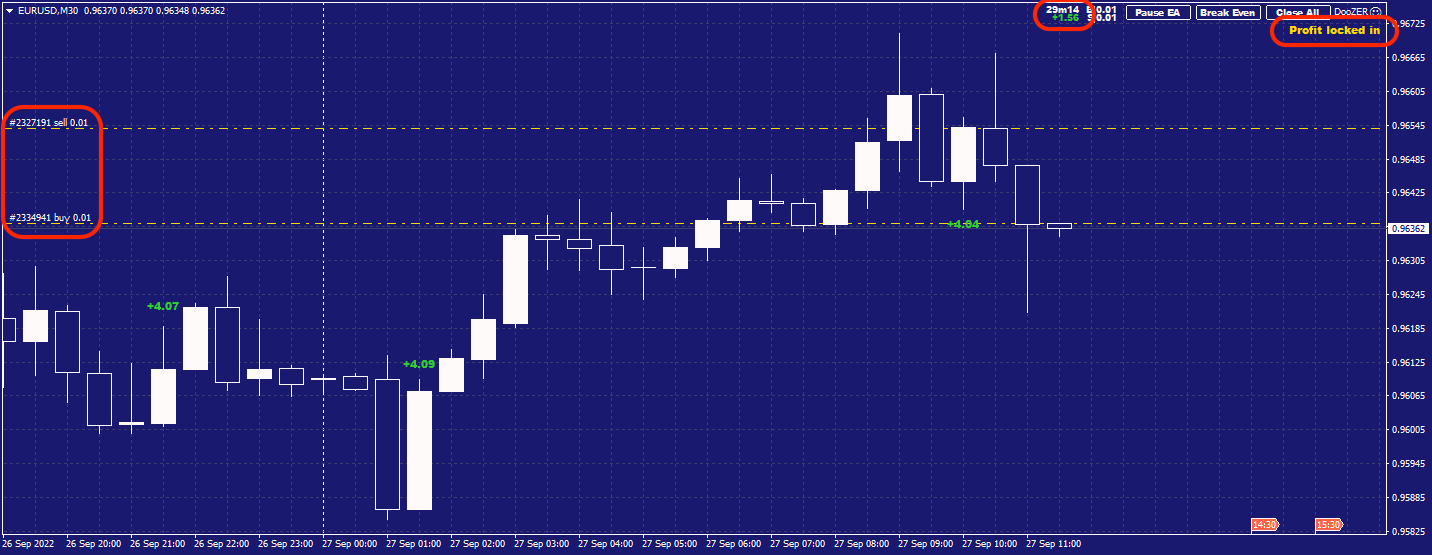
This is a very cool addition we added at a later stage once we started testing DooZER. It wasn’t intended during the design phase. During our tests we realized that sometimes after a “buy” signal and due to the price action, DooZER might receive a “sell” signal. At this point we still don’t know where the price is going to go but we have a buy and a sell order ready to “catch” the trend. Usually these buy and sell orders are really close to each other, and the floating P/L is theoretically zero if the spread is tight, only negative because of the broker comission. In some other cases, though, we observed a “positive” gap between the buy and the sell order where even subtracting the broker’s comission, the floating P/L was positive. So we had a situation where the long volume is equal to the short volume and there’s a positive floating P/L locked in which won’t change regarless what the price might do. We decided that if this locked-in positive P/L was significant enough we would have DooZER cash in the profit and start over. We can’t reveal much more of how, where and when to cash in and open a new trade, but just remember the main concept: conflicting buy and sell signals, price uncertain but positive floating P/L locked in, we’ll normally cash it in, and start a new basket.
Note how when the LockIn feature kicks in, there’s a status message reading “Profit locked in”, and DooZER is ready to close the current basket at the right moment.