

Introduction to the Show Pips Indicator
The MT4 platform has the capability to show profits and losses on the “Trade” window which is usually displayed at the bottom of the platform. However, some traders prefer to see their profits and losses on each currency pair or trading instrument on the price chart itself and the Show Pips Indicator was developed for this purpose.
What is the Show Pips Indicator?
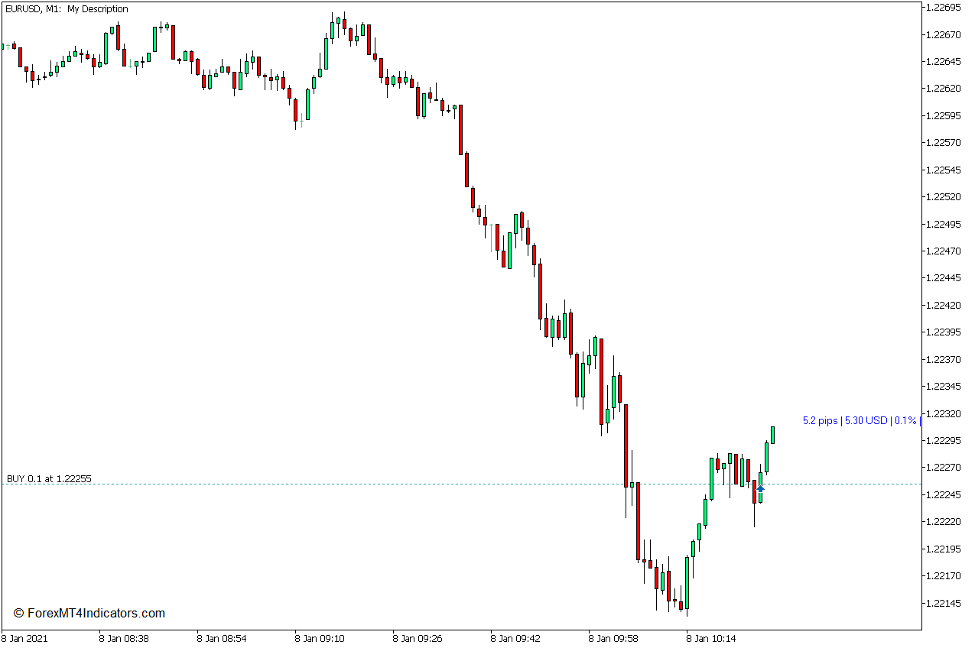
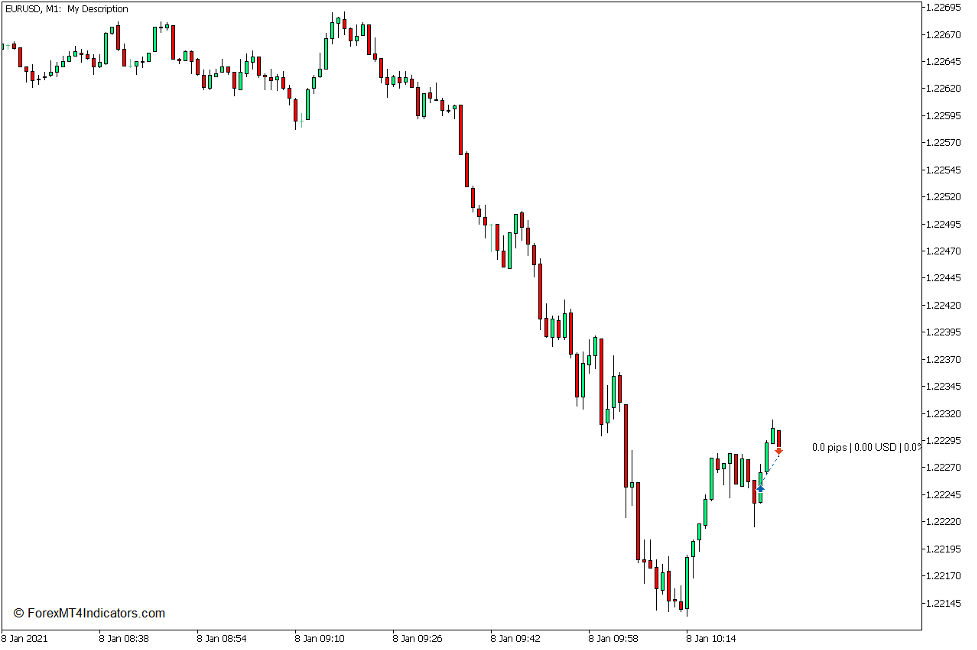
The Show Pips Indicator is a custom technical indicator which shows traders their profit or loss on the price chart displayed in pips, absolute dollar gain, as well as their percentage gained. It also shows the total gain or loss the trader has in a single currency pair or tradeable instrument based on the current open trades.
How the Show Pips Indicator Works?
The Show Pips Indicator simply uses the data provided by the broker’s server. However, it does not just copy the profit and loss data. It also computes for the total gains whenever the trader has multiple trades opened, and it also accounts for the spread of the trade, as well as the cost of the commissions. It then displays the total profit in pips, the profit in US Dollars, as well as the profit in percentage based on the trading account balance.
How to use the Show Pips Indicator for MT5
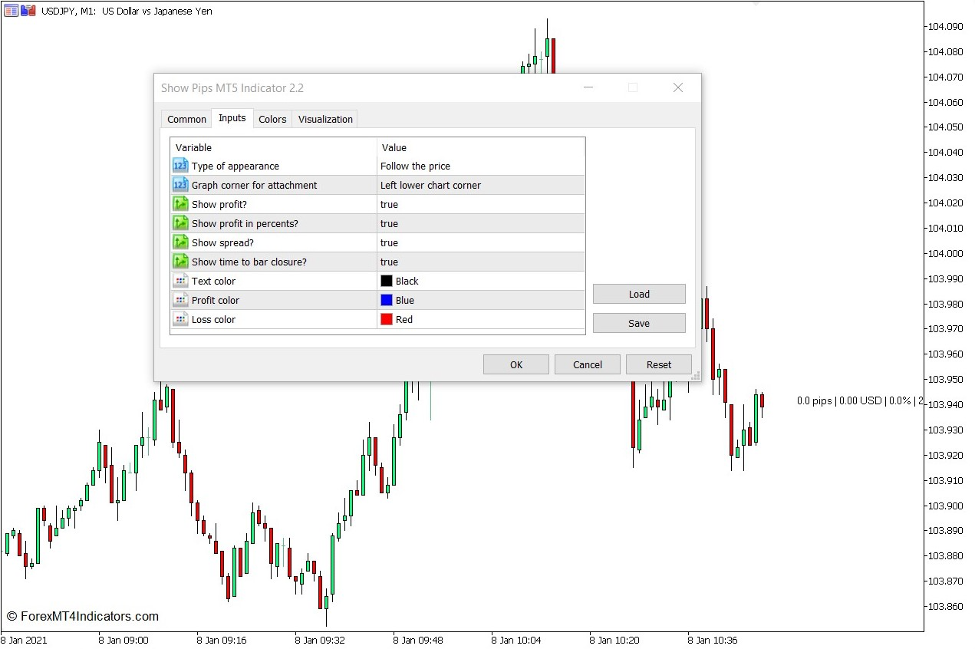
The Show Pips Indicator has several options which traders can modify within the indicator’s settings.
“Type of appearance” modifies how the profit in pips is presented. “Follow the price” plots the data beside the current candle. “As comment” displays the profits on the upper left corner of the chart below the price data. “In selected corner of the screen” displays the data on the corner of the chart.
If the user opts to use the “In selected corner of the screen”, they could then select which corner they would like the information to be displayed on using the “Graph corner for attachment” selection.
“Show profit?” allows traders to choose whether to display the absolute profits of the open trades as a US Dollar figure.
“Show profit in percent?” allows users to toggle the percentage profit display together with the other information.
“Show spread?” shows the spread of the profit or loss in pips.
“Show time to bar closure?” toggles the display of the closing time of the candle on or off.
The other options are purely visual. “Text color”, “Profit color”, and “Loss color” simply changes the color of the fonts displayed on the price chart.
This indicator does not provide trade signals or technical analysis indications. However, traders can use this as a floating information regarding their current profits or loss. They can then assess whether they should close a trade to lock in profits, keep trades open to allow price to move further into profit, or if they would have to cut losses on their losing positions.
Conclusion
This indicator can be useful for traders who would prefer to have their profit or loss displayed in order to keep them accountable for their money management strategies. However, some traders would also find it as a distraction as many traders do tend to be affected whenever they see profits or losses accumulating. It depends on the trader whether this kind of information would be useful for them.
MT5 Indicators – Download Instructions
Show Pips Indicator for MT5 is a Metatrader 5 (MT5) indicator and the essence of this technical indicator is to transform the accumulated history data.
Show Pips Indicator for MT5 provides for an opportunity to detect various peculiarities and patterns in price dynamics which are invisible to the naked eye.
Based on this information, traders can assume further price movement and adjust their strategy accordingly. Click here for MT5 Strategies
Recommended Forex MetaTrader 5 Trading Platforms
#1 – XM Market
- Free $50 To Start Trading Instantly! (Withdrawable Profit)
- Deposit Bonus up to $5,000
- Unlimited Loyalty Program
- Award Winning Forex Broker
- Additional Exclusive Bonuses Throughout The Year

>> Claim Your $50 Bonus Here <<
Click Here for Step-By-Step XM Broker Account Opening Guide
#2 – Pocket Option
- Free +50% Bonus To Start Trading Instantly
- 9.6 Overall Rating!
- Automatically Credited To Your Account
- No Hidden Terms
- Accept USA Residents

How to install Show Pips Indicator for MT5.mq5 to your MetaTrader 5 Chart?
- Download Show Pips Indicator for MT5.mq5
- Copy Show Pips Indicator for MT5.mq5 to your Metatrader 5 Directory / experts / indicators /
- Start or restart your Metatrader 5 Client
- Select Chart and Timeframe where you want to test your mt5 indicator
- Search “Custom Indicators” in your Navigator mostly left in your Metatrader 5 Client
- Right click on Show Pips Indicator for MT5.mq5
- Attach to a chart
- Modify settings or press ok
- Indicator Show Pips Indicator for MT5.mq4 is available on your Chart
How to remove Show Pips Indicator for MT5.mq5 from your Metatrader 5 Chart?
- Select the Chart where is the Indicator running in your Metatrader 5 Client
- Right click into the Chart
- “Indicators list”
- Select the Indicator and delete
Show Pips Indicator for MT5 (Free Download)
Click here below to download:
Download Now

